

Quick ePics 3.3.9.1
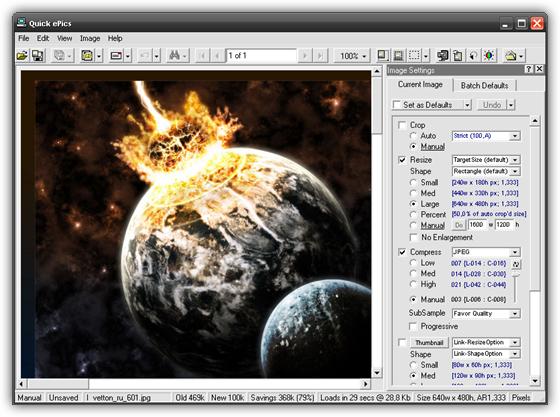
Quick ePics - удобный инструмент для подготовки и оптимизации Ваших изображений. Предназначено для обработки одного изображения или многократных изображений. Показывает размер файла, время создания и обновления изображений, уровень сжатия, или другие аспекты редактирования (цветовые уровни, размер, яркость и т.д.). Может также создать резервные копии Ваших изображений - у Вас всегда будут копии Ваших оригинальных изображений. Программа может также использоваться в качестве редактора изображений.
Особенности программы:
- Extremely Easy to use. (Edit a hundred image as easily as one, and visa versa.)
- Edit images singly or in batch. (Maximum batch size is 32,768 images.)
- Send emails containing one or all images, directly from Quick ePics. (*)
- Two batch modes -- Automatic and Manual (WYSIWYG).
- In automatic mode, 200 to 300 images can be processed in less than a minute. (Results based on a 200 MHz Pentium with 64MB RAM.)
- In manual mode, throughput exceeds standard single image editors by up to 90%.
- True "What You See Is What You Get" (WYSIWYG) batch image editing:
- Slider bar image optimizer, to quickly select the optimal photo compression level. (This is True WYSIWYG jpeg image optimization.) (A side by side image compressor is also included.)
- Slider bar Brightness, Contrast, and Color corrections.
- Drag handles for image cropping and image resizing.
- Peek button, for in place comparison of before and after images.
- Loss-less batch image mirroring and batch image rotation.
- Auto cropping.
- User customizable cropping and resizing presets.
- Creates fast downloading optimized JPEG images. (Up to 98% faster)
- Automatic and Manual image file Renaming. (Give your digital camera images meaningful filenames!)
- Default settings can be specified and applied to all images in a batch.
- Thumbnails - Create companion thumbnails for all or selected images.
- The "Open File Dialog" has an image preview.
- User definable file-open and file-save, shortcut buttons.
- Supports common image formats, including JPG, GIF, BMP, DIB, RLE, TIF, PNG, PCX, PIC, EPIC, TGA, WPG, PPM, and LJP.
- Select images and open batches from Windows Explorer.
- Send JPEG images in emails, directly from Quick ePics. No more fiddling with your email editor's "Insert" picture commands. (Emails with optimized images take less time to deliver and download, and are less likely to be blocked by network mail servers.)
- Drag or copy JPEG files for Auto FTP Upload.
- Exchange Images and Files with other applications using Copy-N-Paste and Drag-N-Drop. (Files and Images can be exchanged with FTP programs, email programs, web-browsers, word processors, other image editors, as well as, Windows Explorer and Windows Search Assistant.)
- Open batches from your own applications, using the Quick ePics command line.
- Copy output filenames into HTML files.
- Create separate default batch sets for different projects.
- Prints images individually or in batch
- Comprehensive online help.
- Separate user data files can be maintained on shared multi-user systems.
Что нового:
- Bug Fix: A change made in v3.3.9, introduced a bug in the file Save dialog. The bug causes the filename textbox to be cleared, whenever the output folder is manually changed. This is obviously very inconvenient, since the output filename must be manually re-entered, before the image can be saved.
Скачать программу Quick ePics 3.3.9.1 (7,26 МБ):
Qantum2 06/05/10 Просмотров: 587
0


